
Since August 15, it has been mandatory to use the CAAT app.
The app not only shows you the restricted flight zones – for these few areas you must first obtain permission from the Royal Thai Air Force. In addition, every flight must be logged in the app with start and landing times.
The app is available in the App Store (iPhone) and the Google Play Store (Android).
Below you’ll find a detailed step-by-step guide for download and use.
⚠️⚠️⚠️
Important:
We completely understand if using the app feels like too much of a hassle. Many travelers feel the same way. Still, we cannot officially advise flying without it.
Should you decide not to use the app, please be aware that it will always be at your own risk.
⚠️⚠️⚠️
Installing the UAS App
Install the app on the smartphone you will use when flying.
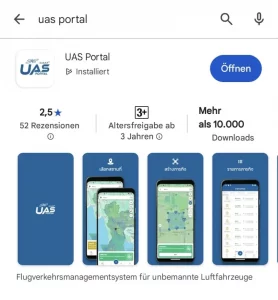
The app is called “UAS Portal.” It is available in the App Stores (iOS) and Play Store (Android), which means download is possible before you arrive in Thailand.
Download
- Search for “UAS Portal” and install the app.
Using the App
The UAS app has two main functions:
- Zone overview
- Shows whether you are in a free zone, a restricted zone, or a no-fly zone.
- For restricted zones, you must apply for permission in advance at the responsible RTAF control center. This process can take a few days.
- Flight notifications
- You must register your flights 3 days in advance in the app.
- Additionally, send the same information by email to antidrone.police@gmail.com (Anti-Aircraft Unmanned Aircraft Center).
- Each flight must also be logged in the app with start and landing time.
- A full guide to using the app can be found here: Video instructions how to use the UAS Portal app Instructions with screenshots UAS Portal App
Background & Understanding
These new rules were introduced in August 2025.
The background is the border conflict with Cambodia. According to the Thai government, drones have been used for reconnaissance flights over Thai military facilities.
Wikipedia about the dispute.
We know that these new rules are restrictive. But our goal is to make legal and stress-free flying in Thailand possible for you. With the permits we obtain from CAAT and NBTC, you can also apply for special permissions, e.g. for flights in national parks.
⚠️⚠️⚠️
We understand if this feels like too much effort. But we cannot recommend flying without the app.
If you do so, it will be at your own risk.
⚠️⚠️⚠️
FAQ: Using the UAS App in Thailand
What is the UAS App?
Mandatory since August 2025 for all drone flights in Thailand.
Where do I get it?
In the App Store (iOS) or Play Store (Android).
How do I install the app?
- Android: Search for “UAS Portal” in the Play Store → Install
- iOS: Search for “UAS Portal” in the App Store → Install
What does the app do?
- Shows your flight zone (free / restricted / prohibited).
➝ Permission required for restricted zones. - Logs your flights:
- Entered 3 days in advance
- Additional email to antidrone.police@gmail.com
- Start and landing times recorded
Why this rule?
Background is the border conflict with Cambodia. The authorities want stronger control over drone flights.
Our note:
We completely understand if using the app feels like too much of a hassle. Many travelers feel the same way. Still, we cannot officially advise flying without it. Should you decide not to use the app, please be aware that it will always be at your own risk.